How to use it
Usage Guide
The F-91W has three buttons and three modes. That's it. Here's everything you need to know.
Button Layout
The watch has three buttons. L (top-left) activates the backlight and is used to advance through settings. A (bottom-left) cycles between modes and adjusts values. C (bottom-right) enters and steps through setting modes.
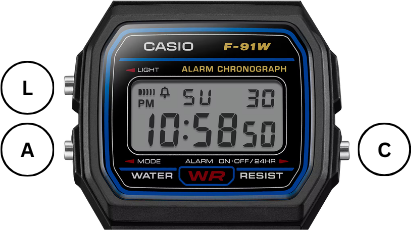
Timekeeping Mode
Normal operation
In timekeeping mode the watch displays the time, date, and day of the week. Press A to switch between 12-hour and 24-hour formats. Press L to light up the display. Press C to move to Alarm mode. Pressing it again moves to Stopwatch mode, and once more returns to Timekeeping.
Setting the time & date
From timekeeping mode, press C three times to enter setting mode. The seconds field will begin flashing. Press A to adjust the flashing field; hold it down to advance quickly. Press L to confirm the current field and move to the next one. The fields step through in this order: seconds, hour, minute, month, date, day of week. Press C on the day-of-week field to save and return to timekeeping mode.
To sync the seconds precisely, wait for a time signal (radio, phone, or TV), then press A on the seconds field exactly on the minute. This resets seconds to :00 and restarts the clock. If you leave a field flashing without pressing anything for a few minutes, the watch gives up and returns to timekeeping mode without saving.
Alarm Mode
Normal operation
Press A repeatedly to cycle through four states: alarm and hourly time signal both on, both off, alarm only, or time signal only. The display shows a bell icon when the alarm is active and a separate mark when the hourly signal is on. Hold L to sound a test beep and confirm the alarm is set correctly. Press C to move to Stopwatch mode.
Setting the alarm
From alarm mode, press L to enter alarm setting. The hour field begins flashing. Press A to increment the hour (hold for quick advance), then press L to move to the minutes field. Adjust with A again, then press L once more to confirm and exit.
When the alarm triggers it sounds for 20 seconds. Press any button to silence it early. There is no snooze.
Stopwatch Mode
Operation
Press A to start and stop the timer. Press L while the stopwatch is running to record a split time. The display freezes on the split while the timer keeps running in the background. Press L again to release the split and return to the live time. When stopped, press L to reset to zero.
The stopwatch supports three timing modes. In net time mode, you start, stop, and restart to accumulate total elapsed time. In split time mode, you record intermediate times without stopping the clock. In 1st/2nd place mode, press L when the first runner finishes to freeze their time, then press A to stop for the second. Both times are recorded.
Maximum capacity is 59 minutes 59.99 seconds. For longer durations, note the time, reset, and start again.
Battery & Maintenance
Battery
The F-91W runs on a single CR2016 3V lithium coin cell, rated by Casio at approximately 7 years based on 20 seconds of alarm use and one second of backlight per day. In practice many owners report it lasting considerably longer. The first sign of a failing battery is usually a dimming backlight rather than any issue with timekeeping.
Opening the case
The case back is secured by four small screws. A JIS #000 screwdriver is the correct tool. A Phillips head will fit but risks rounding the screws. The gasket sits in a groove around the edge of the case back; check it each time you open the watch and replace it if it looks cracked or compressed. The strap uses a standard 18 mm lug width and can be swapped for any compatible 18 mm strap.
The watch is rated to 30 metres water resistance. Opening the case compromises this unless the gasket is replaced and the case is pressure-tested afterwards.
Official Manual
Casio publishes the full module manual as a PDF. It covers every function in detail, including the day-of-week abbreviations used in each regional variant.
Download Module 593 Manual (PDF)Hosted by Casio. Opens in a new tab. Also covers the 3180 module used in some regional variants.